Every migration project has different triggers but the same risk: application state that doesn’t survive the transition. These are the project types where AppProfileSafe delivers the most value. Community Edition handles manual GUI-based migrations at any scale. Enterprise adds CLI automation and SIEM compliance for large rollouts.
The largest migration wave in a decade. End of support deadlines force organizations to move thousands of devices — each with application configurations that must survive the OS transition.
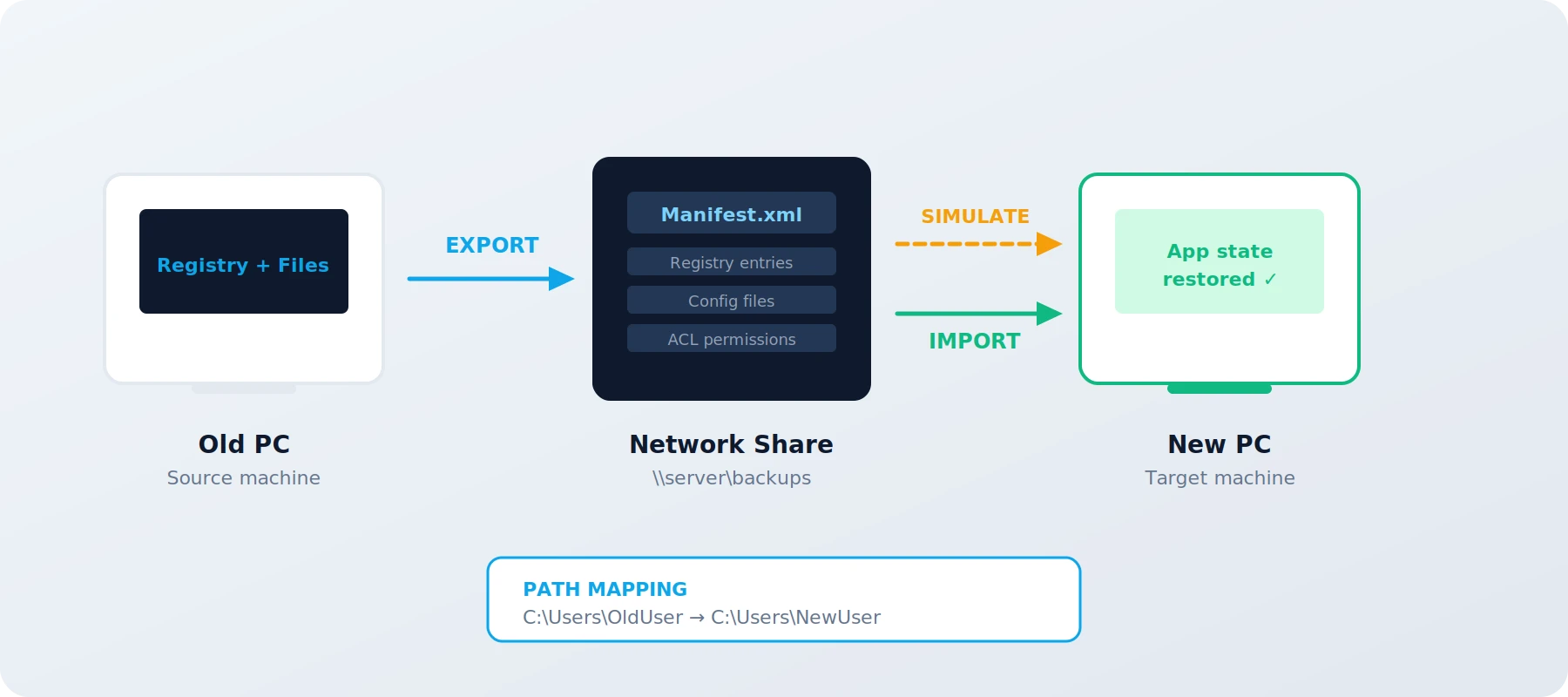
Non-persistent VDI environments reset to a golden image after every session. Application customizations must be captured at session end and restored at next login. The CLI integrates with login/logoff scripts to automate the cycle.
Workflow: Export at logoff via CLI → store manifest on network share → VDI resets to golden image → import at login via CLI. Fully automated, no user interaction.
Key capability: UNC network share support with Credential Manager integration for unattended Scheduled Task operation.
Large rollouts run in waves. Wave 1 validates the process on a small batch. Simulation mode on the first wave catches mapping issues before they multiply across hundreds of devices.
GUI workflow: Export from reference machines → simulate on Wave 1 → review diff report → adjust mappings → import via GUI on subsequent waves.
Enterprise workflow: Deploy to Wave 2–N via CLI with SCCM/Intune/MDT. Preflight validation (--preflight --import) as a pipeline gate before each wave. Enterprise
The combination of manifest-driven scope, simulation-before-import, and hash-chained audit logging creates a verifiable chain from source to target. Every registry key, file, and ACL change is documented and traceable.
Evidence: Diff CSV shows exactly what changed. Local audit log records who did it, when, and from which machine. Enterprise adds automated Compliance Reports and SIEM forwarding for centralized audit.
Rollback: System restore point created automatically before import. Rollback to the pre-import state is one step away.
| Script preparation & testing | 40 h × 85 € | 3,400 € |
| Manual config per device (45 min) | 187 h × 85 € | 15,937 € |
| Error correction (~15%) | 19 h × 85 € | 1,615 € |
| Support tickets (week 1–2) | 20 h × 85 € | 1,700 € |
| Total | 22,650 € | |
| App definitions (one-time) | 4 h × 85 € | 340 € |
| Import + mapping (5 min/device) | 21 h × 85 € | 1,785 € |
| Error correction (~2%) | 1.3 h × 85 € | 106 € |
| Enterprise license (250 devices, Tier S) | 250 × 18 € | 4,500 € |
| Total | 6,731 € | |
Cost comparison uses Enterprise edition with CLI automation. Community Edition reduces the license cost to zero — manual GUI operations take slightly longer per device but require no license.
When organizations restructure, merge, or move to a new Active Directory domain, users get new accounts with new SIDs. Application profiles that reference the old identity break silently.
After a domain migration, users log in with a new account. Their old profile paths contain the previous username. Registry keys reference the old SID. NTFS ACLs point to an identity that no longer exists in the new domain. Applications start with default settings or fail to launch entirely.
Standard domain migration tools (ADMT) handle the AD objects but not the application-level state that references the old identity.
Export application profiles before the domain migration. After users are provisioned in the new domain, import with mapping rules that rewrite the old username, SID references, and profile paths to the new identity. Simulation validates the mapping before any changes are committed. All of this works in Community Edition via the GUI.
Registry values and NTFS ACLs that reference the old user SID are rewritten during import using the mapping engine. The mapping file defines old SID → new SID transformations alongside username and path mappings.
What gets mapped: Registry paths containing the old username or SID. File system paths under the old profile directory. NTFS security descriptors referencing the old account.
Verification: The diff report shows every SID and path transformation before import. No identity references are changed without explicit mapping rules.
Domain migrations happen in phases. AppProfileSafe supports staged transitions where some users have migrated and others haven’t. Each wave uses its own mapping configuration. The local audit log documents which users were migrated, when, and what changed.
Phased workflow: Export all users before migration → migrate AD accounts in waves → import per wave with wave-specific mapping files → review audit log per wave.
Enterprise add-on: Automated Compliance Reports per wave for formal audit evidence. CLI automation for unattended deployment across waves. Enterprise
Mergers, acquisitions, and divestitures require moving users between Azure AD tenants or from on-premise AD to a cloud tenant. Application profiles tied to the old tenant identity need reconstruction in the new environment.
When a user moves between tenants, their UPN changes, their profile path changes, and their local app configurations still reference the old identity. Cloud-synced settings may transfer, but locally stored application state — registry keys, config files, cached credential paths — does not.
Export the user’s application profiles before the tenant move. After provisioning in the new tenant, import with mapping rules that transform the old UPN, username, and profile path references to the new identity. The same mapping file structure handles AD, Azure AD, and hybrid scenarios.
The mapping engine’s separation of registry and file path rules makes it well-suited for tenant migrations where the identity change affects both layers differently. Registry paths may reference the UPN while file paths reference the local username — each is mapped independently.
Registry mapping: Old UPN → new UPN in registry values. Old tenant references in configuration keys.
File mapping: Old local username → new local username in profile paths. Old roaming profile paths → new paths.
In tenant migrations, the goal is not just to copy files — it’s to reconstruct a working application state under a new identity. The combination of registry extraction, file backup, ACL preservation, and path mapping achieves this without manual intervention per device.
What gets reconstructed: Application settings (registry), user preferences (config files), cached paths (registry values referencing old profile), file permissions (ACLs mapped to new identity).
Audit requirement: M&A scenarios often have compliance requirements. The tamper-evident local audit trail documents every change. Enterprise adds SIEM forwarding and Compliance Reports for both organizations. Enterprise
When replacing one application version with another — or migrating between competing products — parts of the old configuration may be transferable. Not all of it, and not without transformation.
Application upgrades or replacements often change registry key structures, configuration file formats, or storage locations. A full profile migration would import obsolete or incompatible settings. What’s needed is selective extraction of the settings that remain valid.
Create app definitions that target only the transferable configuration elements. Export the specific registry keys and files that the new application version supports. Use mapping rules to transform paths where the new version stores settings in different locations.
App definitions give surgical control over what gets exported. Instead of capturing the entire registry subtree, define only the keys and values that are compatible with the new version. The manifest-driven approach ensures nothing is accidentally included.
Example: Migrating from App v3 to v4. User preferences (colors, layout, shortcuts) are stored in the same registry structure. Plugin configurations have moved to a new key path. Connection strings are compatible. Cache settings are version-specific and excluded.
Definition reuse: Once the v3-to-v4 definition is created, it works for every device in the rollout. One definition, hundreds of imports.
Export specific registry values rather than entire keys. Target individual configuration entries that are known to be compatible. The diff report shows exactly what will be written to the target before any changes are made.
Per-value targeting: App definitions support per-value scope. Export only the preference values you need — skip everything else under that key.
Simulation: Run the import in simulation mode first. The diff report confirms that only the intended values will be written. No surprises from inherited or adjacent settings.
In environments governed by ISO 27001, BSI IT-Grundschutz, or GDPR, every system change must be documented, traceable, and auditable. Migration operations are no exception.
Scripts and manual registry edits produce no audit trail. There is no proof of what changed, when, by whom, or whether the change was validated before execution. When auditors ask for evidence of a controlled migration process, there is nothing to show.
AppProfileSafe generates tamper-evident audit logs and structured diff reports for every operation — included in Community Edition. Enterprise adds SIEM forwarding, automated Compliance Reports, and per-field redaction for centralized audit compliance.
Every export, import, and simulation is recorded in a hash-chained audit log. Each entry contains a timestamp, operator identity, action, target, success status, and an HMAC-SHA256 hash linking it to the previous entry. Tampering with any entry breaks the chain.
What auditors see: WHO performed the operation (Windows user), WHAT was changed (application, registry keys, files), WHEN it happened (UTC timestamp), WHETHER it was validated first (simulation status), and HOW integrity was maintained (hash chain).
Compliance reports: Generated from the audit trail via CLI (--generateComplianceReport) or GUI. Schedulable monthly via Task Scheduler. Enterprise
Audit events are forwarded to SIEM platforms through the event pipeline. Events carry severity classification, category routing, and per-field redaction. Webhook endpoints receive HMAC-signed payloads for replay protection.
Integration: CEF, JSON, LEEF via HTTP. Syslog via UDP. Windows Event Log for WEF/AMA. Each channel operates independently — a webhook failure does not affect SIEM delivery.
PII protection: Per-sink redaction policies hash, mask, or suppress sensitive fields before events leave the system. Strict policies for external SIEM, moderate policies for internal monitoring.
Full audit trail (all editions), access logging, and data handling transparency support information security management requirements.
On-premise operation, no external data flows, and deterministic behavior align with baseline protection requirements.
Data redaction (Enterprise), local-only processing, and no telemetry collection support data protection by design and by default.
Machine-readable logs with timestamps, operator identity, and per-object results provide auditors exactly what they need.
Migration is a one-time event. But application profiles keep changing every day. With Enterprise, AppProfileSafe runs as a continuous backup solution — protecting application state against hardware failures, profile corruption, and the next migration.
Scheduled Tasks export machine-level and user-level settings on separate schedules. Machine data is backed up nightly via the SYSTEM account. User data is captured at logon. Both write to a central network share.
Split-job architecture: Separate jobs for HKLM/ProgramData (SYSTEM context) and HKCU/AppData (user context) ensure environment variables resolve correctly and permissions match the target data.
Key capability: CLI automation (AppProfileSafe.CLI.exe) with UNC credential store for fully unattended operation.
When a laptop fails, a profile gets corrupted, or a user moves to new hardware, restoration follows a proven sequence: machine settings first, user settings after first logon. A mapping file handles identity and path differences.
Scenarios covered: Fresh client build, hardware swap, profile reset, in-place Windows upgrade, side-by-side migration with parallel operation.
First-launch protection: A delayed import pattern prevents applications like Outlook, Firefox, and Teams from overwriting restored settings during their first-run initialization.
User-level restores can be delivered via GPO logon scripts, Scheduled Tasks, Intune remediation scripts, SCCM applications, or a simple desktop batch file for self-service. A marker file prevents duplicate imports.
Enterprise (automated): GPO, Scheduled Task, SCCM, or Intune for zero-touch restore via CLI. Enterprise
Community (manual): Desktop shortcut or GUI — the user controls when settings are restored after applications have initialized.
Our documentation includes step-by-step guides for every scenario — from initial export setup to restore on a new client. Each guide includes ready-to-use CLI commands, batch scripts, and checklists.
10 customers, 500 devices each, 1 migration project per customer per year. 6 apps average. Enterprise licenses with CLI automation.
| Scripts per customer | 10 × 16 h × 95 € | 15,200 € |
| Manual work (45 min/device) | 3,750 h × 95 € | 356,250 € |
| Error correction (15%) | 375 h × 95 € | 35,625 € |
| Support tickets | 400 h × 95 € | 38,000 € |
| Total per year | 445,075 € | |
| App definitions (one-time) | 20 h × 95 € | 1,900 € |
| Import + mapping (5 min/device) | 417 h × 95 € | 39,615 € |
| Error correction (2%) | 25 h × 95 € | 2,375 € |
| Enterprise license (Silver, 30% off, cumul.) | 5,000 dev. × 0.70 | 41,300 € |
| Total Year 1 | 85,190 € | |
License margin: Buy at 41,300 € (Silver), sell at 59,000 € list price = 17,700 €/year recurring.
Freed capacity: 3,730 hours no longer spent on manual migration. Conservatively, 30% redirected to billable projects = 1,119 h × 95 € = 106,305 €/year.
Year 2+ savings: Definitions exist and only need updates. Year 2 total drops to ~83,300 € — the margin grows further.
Scaling: Each new customer adds ~1,900 € one-time + recurring license revenue. The per-customer cost decreases as you reuse definitions across similar environments.
| Windows 10 → 11 migration | ✓ |
| Domain migration (AD restructuring) | ✓ |
| Tenant migration (M&A, divestitures) | ✓ |
| Application version upgrade / replacement | ✓ |
| VDI refresh / non-persistent desktops | ✓ |
| Regulated environments (ISO, BSI, GDPR) | ✓ |
| Ongoing profile backup & fast recovery | ✓ |
| Sync desktop settings only | Use native OS/cloud settings |
| Move documents & files | APS focuses on app state |
| Cross-OS migration (Win → Mac) | Windows only |
Pick one critical application. Export it. Simulate the restore. Community Edition is free and unlimited — that answers “does it work?” before any commitment.