Operations

Nothing runs without validation.
Nothing breaks without notice.

AppProfileSafe is designed for environments where unplanned changes are unacceptable. Every operation is preflight-checked, simulation-gated, and logged to a tamper-evident audit trail. Enterprise adds health monitoring, SIEM observability, and CLI automation. This page documents the operational guardrails for IT operations teams.

Preflight Validation

Verify every precondition before execution

The preflight system validates the execution environment before any export or import begins. In the GUI, preflight runs automatically before every operation. Enterprise adds CLI preflight with structured JSON reports for deployment pipeline gates.
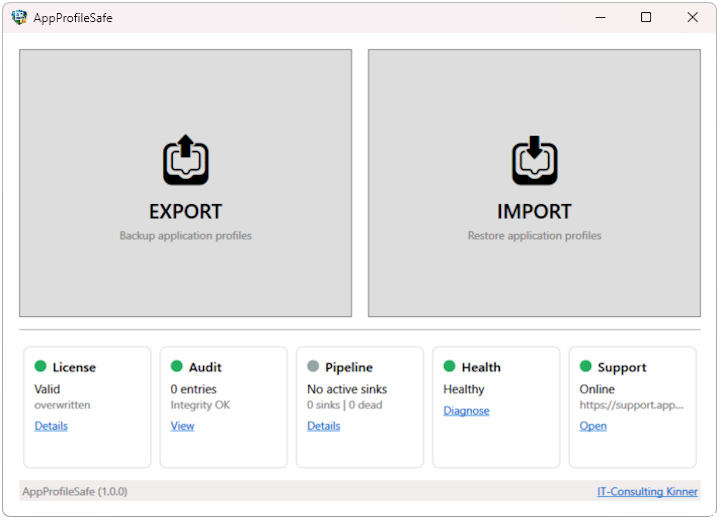
AppProfileSafe Dashboard showing health status tiles
Preconditions

Environment Checks

Preflight validates the execution environment before any data operation. Checks include manifest path accessibility, app definition schema compliance, disk space availability, and audit log integrity.

GUI integration: Health dashboard tiles show real-time status for License, Audit, and Health. Issues are visible before the user opens the export or import dialog. Preflight runs automatically before every operation.

CLI integration: --preflight --export or --preflight --import runs all checks and exits with a structured JSON report. Non-zero exit code if any check fails. Designed for deployment pipeline gates. Enterprise

  • Manifest path existence and write access
  • App definition XSD schema validation
  • Disk space estimation and validation
  • Audit log integrity (hash chain verification)
  • License validation (Enterprise: feature flags and expiry)
  • SIEM endpoint connectivity Enterprise
CLI Reference →

Disk Validation

Before export, preflight estimates the required disk space based on the app definitions and checks available space on the target volume. Before import, it validates space on the volumes where registry hives and file targets reside.

Export check: Estimates total size from defined registry scope and file paths. Compares against available space on the manifest target volume (local or UNC).

Import check: Validates available space on the system volume (registry) and all target file system volumes. Accounts for ACL metadata overhead.

Permission Checks

Preflight verifies write access to target paths before the operation begins. For export, it confirms the manifest directory is writable. For import, it checks write access to target registry keys and file directories — catching permission issues before any changes are attempted.

Registry: Verifies write access to target hives and keys. Reports specific keys where access is denied.

File system: Tests write access to target directories. Reports inaccessible paths with the underlying Windows error code.
Health Monitoring

Continuous readiness verification

Health checks run on application startup and can be triggered on demand. Each check reports Healthy, Degraded, or Unhealthy with diagnostic detail. Community Edition monitors disk space and audit integrity. Enterprise adds SIEM, webhook, and queue monitoring with dashboard tiles and event emission.

Queue Status Enterprise

Inspects the event queue for pending, retrying, and dead-lettered events. Reports Degraded when events exceed a configurable age threshold. Reports Unhealthy when the queue file is inaccessible or contains corrupted entries.

Diagnostics: Reports pending event count, oldest pending event age, per-sink delivery summary, and dead letter count.

Operational signal: A growing queue or accumulating dead letters indicates a downstream delivery problem. The health check makes this visible before it becomes a compliance gap.

SIEM Connectivity Enterprise

Tests the configured SIEM HTTP endpoint with a lightweight probe request. Validates response status, authentication acceptance, and round-trip timing. Reports Unhealthy if the endpoint is unreachable or rejects credentials.

Auth methods tested: Bearer token, API Key, Basic auth, Splunk HEC. The health check uses the same authentication path as production event delivery.

CLI exit code 4: When preflight detects SIEM failure, the CLI exits with code 4 — preventing operations that would generate undeliverable audit events.

Webhook Validation Enterprise

Tests connectivity to each configured webhook endpoint. Validates that the endpoint is reachable, responds within the timeout, and accepts the HMAC-signed test payload. Reports per-endpoint status independently.


Signature test: The health check sends a test payload with a valid HMAC-SHA256 signature. Endpoints that reject the signature are reported as Unhealthy with an authentication detail message.

Independent status: Each webhook endpoint has its own health status. One failing endpoint does not affect the others or the SIEM health status.

Execution Safety

Guardrails that prevent accidental changes

The GUI enforces a strict validation-before-execution workflow. Imports cannot run without prior simulation. Mapping changes invalidate previous simulation results. These are architectural constraints, not optional settings.

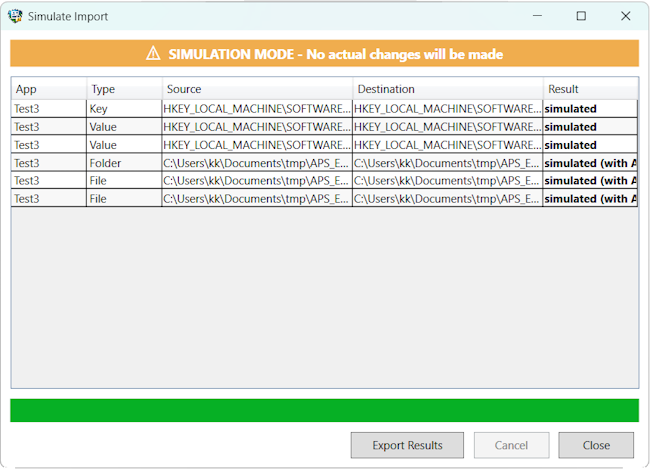
AppProfileSafe Simulation Progress
Workflow

Dry Run Required Workflow

In the GUI, the import button remains disabled until a simulation has completed successfully for the current configuration. This is not a user preference — it is enforced by the application state machine. No simulation, no import.

What this prevents: Accidental imports on production endpoints. Imports with untested mapping rules. Changes committed without reviewing the diff report.

CLI behavior: The CLI does not enforce simulation-before-import (automation scenarios require flexibility). For gated workflows, use --preflight --import as a pipeline prerequisite. Enterprise

  • Import button disabled until simulation completes
  • Simulation runs the full import pipeline in read-only mode
  • Diff report generated for review before committing
  • No runtime override — enforced by application state
Documentation →

Controlled Import Activation

The import operation activates only after three conditions are met: a valid manifest is loaded, the simulation has passed, and the current mapping configuration matches the one used during simulation. If any condition changes, the import button reverts to disabled.

State machine: The GUI tracks a 3-state progression: ManifestLoaded → SimulationPassed → ImportReady. Any state regression (manifest change, mapping change, simulation failure) resets to the earliest affected state.

Visual feedback: The import button shows the current blocker reason. Users see exactly what needs to happen before import becomes available.

Mapping Change Reset Logic

Changing the mapping configuration after a successful simulation invalidates the simulation result. The import button is disabled, and the user must re-run the simulation with the updated mappings before import becomes available again.

What triggers reset: Loading a different mapping file, modifying mapping rules in the editor, or switching between mapping configurations. Any change to the transformation that affects the import outcome resets the workflow.

Why this matters: A simulation result is only valid for the exact configuration that produced it. Allowing import after a mapping change would mean committing untested transformations.

Observability

From local audit trail to SIEM delivery

Every operation is logged to the tamper-evident local audit trail (all editions). Enterprise extends observability with structured event dispatch to SIEM, webhooks, and syslog sinks — with per-sink delivery tracking and dead letter handling.

Local Audit Trail

Every operation is recorded in an HMAC hash-chained local audit log. The Audit Log Viewer displays entries with filtering and integrity verification. This is the foundation of observability — always available, regardless of edition.

What’s recorded: Export, Import, Simulation, Preflight — with timestamp, operator identity, action, target, and success status.

Integrity: Each entry is hash-linked to the previous entry. Tampering breaks the chain. Verified on startup and on demand.

Severity Trigger
Critical Integrity failure, unauthorized access
Error Export/import failure
Warning Partial success, validation issues
Info Normal operations

Event Pipeline Enterprise

Enterprise extends the local audit trail with structured event dispatch. Every operation emits a ProfileSafeEvent with typed payload, category classification, and execution context. Events are dispatched to all configured sinks in parallel.

Event categories: Export, Import, Simulation, Security, Privacy, System. Each category can be routed to specific sinks or filtered in SIEM queries.

Correlation: Related events share an OperationId (GUID). Query all events for a single export or import operation with one filter.

Level Output
Debug Detailed diagnostics, method-level tracing
Info Operation progress, configuration loads
Warning Recoverable issues, fallback paths
Error Failures requiring attention

Delivery Tracking Enterprise

Every event tracks delivery state per configured sink. Operations teams can verify that audit events reached SIEM, webhook, Event Log, and syslog destinations — or identify exactly which sink failed and why.


Per-sink states: Pending, Delivered, Retrying, Failed. Each sink advances independently. A webhook timeout does not affect SIEM delivery status.

Queue inspection: The health check reports pending event count, oldest pending age, and per-sink delivery summary. Dead-lettered events trigger a Degraded health status.

State Next action
Pending Dispatch on next cycle
Delivered Remove after all sinks terminal
Retrying Exponential backoff (max 5)
Failed Dead letter with diagnostics

Operations at a glance

Preflight GUI: automatic before every operation. CLI: JSON report with per-check pass/fail, non-zero exit code on failure. CLI: Enterprise
Local audit HMAC hash-chained CSV. Written synchronously. Integrity verified on startup. Audit Log Viewer with filtering. All editions.
Health checks Disk space and audit integrity (all editions). SIEM, webhook, and queue monitoring. Enterprise
Simulation gate GUI import disabled until simulation passes. Mapping changes reset simulation state. No override. All editions.
Import activation Three conditions: valid manifest, passed simulation, matching mapping config. Any change resets to earliest affected state.
Event pipeline ProfileSafeEvent envelope with typed payloads. 6 categories, 4 severity levels, deterministic EventId. Enterprise
Delivery tracking Per-sink state (Pending/Delivered/Retrying/Failed). Exponential backoff. Dead letter with full diagnostics. Enterprise
Diagnostics Separate log levels (Debug/Info/Warning/Error) from event severity. Debug logging does not flood SIEM. All editions.
CLI automation --preflight for pipeline gates. --silentMode for unattended operation. Structured exit codes (0–5). Enterprise

Test the operational model

Download Community Edition to run preflight checks, trigger simulations, and inspect the local audit trail. Contact us for Enterprise to configure SIEM forwarding, webhooks, and CLI automation.