Security & Compliance

No cloud. No telemetry.
No trust required.

AppProfileSafe runs entirely on-premise. Every operation is auditable, every data flow is transparent, and no information leaves your network. This page documents the security architecture for CISOs, compliance officers, and IT security teams. The security model applies equally to Community Edition and Enterprise.

Local-Only Execution

100% on-premise. Zero external dependencies.

AppProfileSafe is a standalone Windows desktop application. It runs on the endpoint, reads and writes to local or network paths, and never opens a connection to an external host.

No Cloud Dependency

There is no cloud backend, no SaaS component, and no external API integration. The application operates fully offline. License validation uses locally available identity attributes — Active Directory domain SID or Azure tenant UUID — without network calls.

What this means for your infrastructure: No firewall rules, no proxy exceptions, no outbound allow-lists. AppProfileSafe works in air-gapped environments without modification.

No Telemetry

AppProfileSafe collects no usage data, no crash reports, no analytics, and no hardware identifiers. There is no phone-home mechanism, no update checker, and no background service. The application runs when invoked and does nothing else.

Verifiable: The application makes zero outbound network connections. This is testable with any network monitor or packet capture tool. SIEM forwarding (Enterprise) is the only optional outbound path — configured and controlled by you.

What AppProfileSafe never does

  • Never opens network connections to external hosts
  • Never collects hardware identifiers, IP addresses, or usage telemetry
  • Never accesses user credentials, passwords, or tokens
  • Never reads outside of manifest-defined scope
  • Never modifies Active Directory, Group Policy, or domain objects
  • Never writes to system-protected directories unless explicitly mapped
Audit Integrity

Tamper-evident logging with cryptographic verification

The audit log is a hash-chained CSV where each entry’s HMAC depends on the previous entry. Any modification, deletion, or reordering of entries breaks the chain and is detected on the next integrity check. Included in all editions.
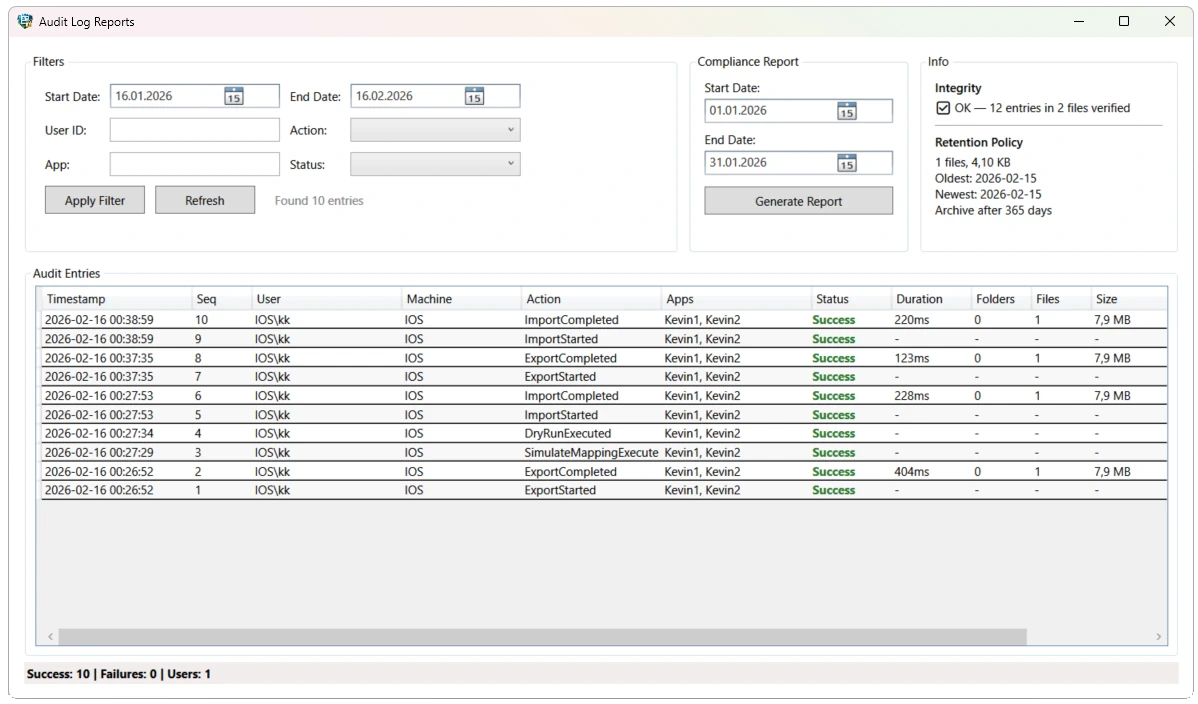
AppProfileSafe Audit Log Viewer
Verification

AuditIntegrityService

The integrity service verifies the complete audit trail on every application startup. It reads all audit CSV files in chronological order, checks sequence number continuity, and validates that each entry’s PreviousHash matches the preceding entry’s EntryHash.

Hash chain: Each entry is HMAC-SHA256 signed using a key stored in Windows Credential Manager. The hash covers timestamp, sequence number, user, action, target, and success status. Fallback to unsigned SHA-256 if no HMAC key is available.

Startup check: Integrity verification runs automatically in both Community and Enterprise editions. In Enterprise, failures are additionally dispatched as Critical severity events to SIEM.

  • Chronological file processing (audit_yyyy-MM.csv)
  • Sequence gap detection across monthly file boundaries
  • Hash chain continuity verification (PreviousHash == EntryHash[n-1])
  • HMAC key stored in Windows Credential Manager
  • Integrity failures visible in Audit Log Viewer (all editions)
  • Integrity failures dispatched as Critical events to SIEM Enterprise

Tamper Detection

The hash chain design means that modifying any single entry invalidates all subsequent entries. Deleting an entry creates a sequence gap. Inserting an entry breaks the hash chain. Reordering entries breaks both sequence and chain.

Detection scope: Entry modification, entry deletion, entry insertion, entry reordering, and diff CSV tampering (DiffHash= in Details field verified separately).

Retention Policies

The AuditRetentionService manages log lifecycle with configurable retention periods. Logs past the retention window are either archived to a separate path (with a LogArchived audit entry recording the last hash and sequence) or deleted. Associated diff CSV files are cleaned up automatically.

Archival audit trail: When a log file is archived, the archival operation itself is recorded in the active audit log with the archived file’s last sequence number and hash — maintaining chain of custody.

Redaction Engine Enterprise

Strip sensitive fields before events leave the system

Before audit events are forwarded to SIEM endpoints, webhooks, or external systems, the redaction engine applies per-sink policies that mask, hash, or remove sensitive fields. Policies are defined in XML with dot-notation field paths and validated against XSD.

HashRule

Replaces the field value with a one-way SHA-256 hash. The original value cannot be recovered, but identical inputs produce identical hashes — enabling correlation across events without exposing the underlying data.

Use case: Hash UserName or MachineName for SIEM correlation while preventing PII from reaching external systems.

PartialMaskRule

Preserves a configurable number of leading or trailing characters and replaces the rest with a mask character. Retains enough context for triage without full disclosure.


Example: john.doe becomes jo****oe. Visible prefix and suffix are configurable per rule.

SuppressRule

Removes the field entirely from the event payload before forwarding. The field key is preserved with an empty or null value, maintaining the event schema while eliminating the sensitive content.

Use case: Suppress Details or ErrorMessage fields that may contain file paths with embedded usernames.

Configurable Policies

Redaction policies are defined per sink in XML configuration. Each SIEM endpoint, webhook, or Event Log sink can have its own redaction profile. Field paths use dot-notation (e.g. Context.UserName, Payload.Details) and are validated against the Redaction XSD at startup.

Strict policy (external SIEM): Hash all identity fields, suppress error details, mask machine names. Minimizes PII exposure to third-party systems.

Moderate policy (internal webhook): Hash usernames only, preserve details for operational triage. Balances privacy with incident response needs.

Validation: Redaction XML is validated against the Redaction XSD at application startup. Invalid field paths or unknown rule types are rejected before any events are processed.

Sink mapping: SinkMappings in the redaction config assign policies to specific sinks by name. Sinks without an assigned policy receive no redaction — explicit opt-in required.

Compliance Reporting

Structured evidence from audit data

The local audit trail provides the foundation for compliance evidence in all editions. Enterprise adds automated Compliance Reports (PDF) and SIEM forwarding for centralized audit collection.

RunReportBuilder

Every GUI and CLI operation produces a structured JSON run report. The report captures the operation type, application list, manifest path, timing, per-application results, and the final exit code. Reports are saved alongside the manifest.

Content: Operation type, interface (CLI/GUI), app list, start/end timestamps, per-app success/failure, file and registry counts, total data size, exit code.

Compliance Reports Enterprise

Compliance reports are generated from the audit trail as automated PDFs. Reports include generation metadata: date range, generating machine, operator identity, and report format version. Schedulable via Task Scheduler for monthly delivery.

Generation: CLI via --generateComplianceReport with optional --reportFrom / --reportTo date range. Defaults to previous month. Also available via the GUI Audit Log Viewer.

SIEM Forwarding Enterprise

Audit events are forwarded to SIEM endpoints through a queue-based event pipeline with per-sink delivery tracking, exponential backoff, and dead-letter handling. Each sink operates independently — a webhook failure does not block SIEM delivery.

Formats: CEF, JSON, LEEF via HTTP. Syslog via UDP. Authentication: Bearer, API Key, Basic, Splunk HEC. Webhook endpoints receive HMAC-SHA256 signed payloads for replay protection.

ISO 27001


Full audit trail, access logging, and data handling transparency support information security management requirements.

BSI IT-Grundschutz


On-premise operation, no external data flows, and deterministic behavior align with baseline protection requirements.

GDPR / DSGVO


Data redaction (Enterprise), local-only processing, and no telemetry collection support data protection by design and by default.

Internal Audit


Machine-readable logs with timestamps, operator identity, and per-object results provide auditors exactly what they need.

Secure Design

Defense-in-depth at the application level

Security is not a feature layer — it is embedded in the application’s operational primitives. File writes, process isolation, credential handling, and path validation are hardened by design. These protections apply to all editions.

Atomic File Operations

All file writes use a write-to-temp, then atomic-move pattern. If the process is interrupted mid-write, the target file is never left in a partial or corrupted state. The audit log, event queue store, and export archives all use the same AtomicFileWriter.

Implementation: Write to a temporary file in the same directory, then File.Move with overwrite. Same-directory ensures same-volume for atomic rename. Cross-process mutex protection on shared files.

Single Instance Guard

A system-wide named mutex prevents concurrent execution of multiple AppProfileSafe instances. This eliminates race conditions on shared resources: the audit log, event queue, and export archives are never accessed by competing processes.

Recovery: Abandoned mutex detection handles unclean shutdowns. If a previous instance crashed without releasing the mutex, the next instance recovers ownership instead of blocking indefinitely.

Secret Resolution

Sensitive values — HMAC signing keys, UNC credentials, SIEM authentication tokens — are stored in Windows Credential Manager and resolved at runtime through the ISecretStore interface. Secrets never appear in configuration files, log output, or event payloads.

Credential references: Configuration files reference credentials by target name (e.g. AppProfileSafe:Audit:HmacKey). The credential store resolves the actual value at runtime. First-run key generation is automatic.

Path Validation

Before any write operation, the import engine validates that target paths resolve within expected boundaries. Manifest entries referencing paths outside the application scope are rejected. This prevents mapping misconfigurations from writing to unintended system locations.

What it catches: Mapping rules that accidentally rewrite to system directories. Absolute paths that bypass environment variable expansion. Path traversal attempts via .. segments.

Security at a glance

Deployment model Standalone .NET 8 Windows application. No services, no agents, no background processes. Same binary for Community and Enterprise.
Network requirements None. Operates fully offline. Optional SIEM forwarding (Enterprise) is the only outbound path, configured and controlled by the administrator.
Telemetry None. No usage data, crash reports, hardware identifiers, or analytics. Verifiable with any packet capture tool.
Credential storage Windows Credential Manager. HMAC keys, UNC credentials, and SIEM tokens are never stored in config files.
Audit logging HMAC-SHA256 hash-chained CSV with sequence numbers. Integrity verified on every startup. Included in all editions.
SIEM integration CEF, JSON, LEEF via HTTP. Syslog via UDP. Webhooks with HMAC-SHA256 signatures. Per-sink redaction policies. Enterprise
Compliance reports Automated PDF from audit data. CLI and GUI generation. Schedulable monthly. Enterprise
Data redaction Per-sink policies with hash, partial mask, and suppress rules. XSD-validated configuration. Explicit opt-in per sink. Enterprise
File write safety Atomic write pattern (temp + rename). Single instance mutex. No partial files on crash or interruption.
License validation RSA-PSS signed XML, validated offline against embedded public key. Enterprise licenses bound to AD domain SID or Azure tenant UUID. Community Edition requires no license.
Third-party dependencies None. Self-contained .NET 8 application. No external libraries, runtimes, or services required.
Executable signing Authenticode-signed with EV code signing certificate. SHA256 hash published on the download page.
Security Disclosure

Report a vulnerability

If you discover a security issue in AppProfileSafe, please report it responsibly. We take every report seriously and respond within two business days.

security@appprofilesafe.com

Please include a description of the issue, reproduction steps, and the affected version. Do not disclose vulnerabilities publicly before coordinated resolution.

Evaluate in your environment

Download Community Edition and run it on your infrastructure. No registration, no cloud connection, no outbound traffic. Full audit trail included.