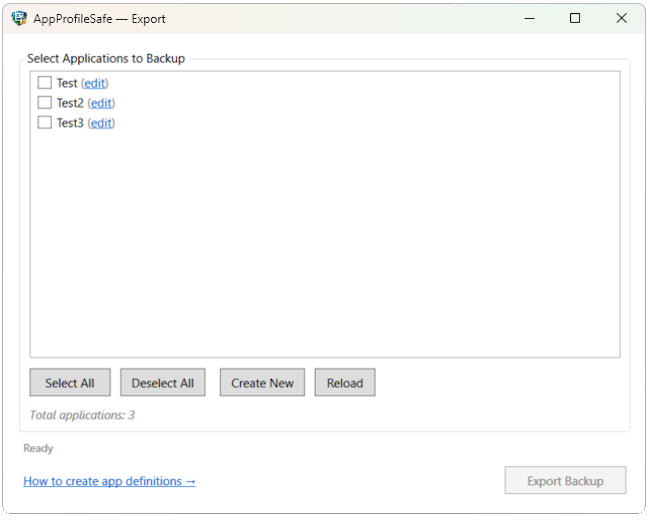
AppProfileSafe is a manifest-driven migration engine for Windows application profiles. Five functional systems handle extraction, transformation, validation, automation, and licensing. Core migration features are free in Community Edition. Enterprise adds CLI automation, SIEM integration, and compliance reporting.
The migration engine captures application state from the registry, file system, and NTFS security layer. Data is written atomically and validated against XSD schemas before commit.
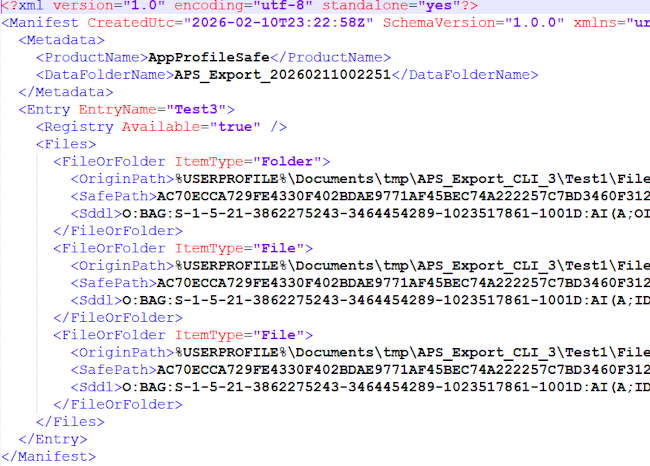
Exports full keys or individual values from any supported hive. All native data types are preserved — REG_SZ, DWORD, QWORD, BINARY, MULTI_SZ, EXPAND_SZ. Protected keys are logged and skipped without aborting the operation.
Scope control: App definitions specify per-key or per-value targets. Only what is defined gets exported — no hive-wide snapshots, no accidental captures.
Resilience: Access-denied on protected keys is logged with full detail but never aborts the export. Remaining entries continue normally.
Backs up application files and folders with recursive traversal or single-file targeting. Paths use environment variables for portability across machines. The manifest records file hashes and sizes for downstream diff comparison.
Portability: Paths are stored with environment variables (%APPDATA%, %LOCALAPPDATA%, %USERPROFILE%, %PROGRAMDATA%) and expanded at import time on the target machine.
Manifest tracking: Each entry records DataFolderName, content hash (SHA256), and file size. The dry run engine uses these for change detection.

NTFS security descriptors are captured during export using AccessControlSections.All and restored during import. Existing files receive additive ACL merges; new files get the full descriptor.
Consistency: Export and dry run both read AccessControlSections.All for comparison. Import applies .Access for existing files (additive merge) and .All for new files.
All file operations use a write-to-temp, then atomic-move pattern. If the process is interrupted mid-write, the target file is never left in a partial state.
Implementation: AtomicFileWriter writes to a temporary file in the same directory, then calls File.Move with overwrite. The event queue store uses the same pattern.
Before any write operation, the import engine validates that target paths are within expected boundaries. Entries referencing paths outside the application scope are rejected.
What it catches: Mapping rules that accidentally rewrite to system directories. Manifest entries with absolute paths that bypass environment variable expansion.
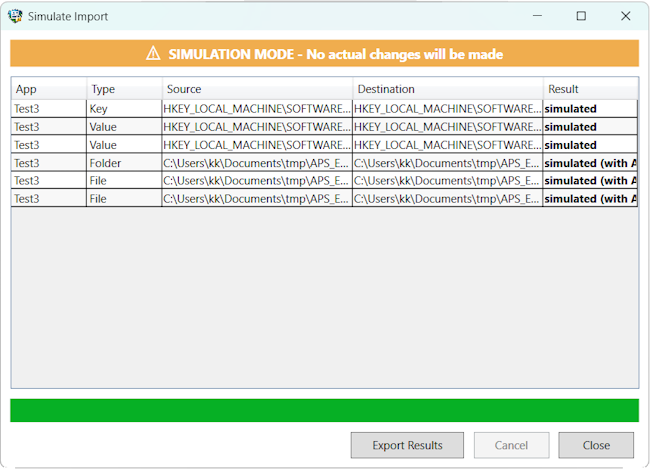
When the target environment differs from the source — different username, drive letter, or directory structure — the mapping framework rewrites paths during import. Rules are defined in XML, validated, previewed, and applied deterministically.
The MappingService holds separate rule sets for registry paths and file system paths. Rules are loaded from XML, validated against the Mapping XSD, and applied after environment variable expansion — in the same order for both live imports and dry runs.
Mapping files are validated against the Mapping XSD schema before loading. Invalid structures, missing attributes, or malformed paths are rejected at load time — not discovered mid-import.
The MappingService is a session-scoped singleton that holds loaded rules across operations. Once mappings are loaded, they remain active for all subsequent imports and simulations in the same session.
Common transformations — username changes, drive letter swaps, base path relocations — are expressed as declarative rules. Configurations are saved and reused across operations and machines.
MSP workflow: Create one mapping file per customer environment. Reuse across all devices in that tenant. Store alongside the manifest on the network share.
| From | To |
|---|---|
| C:\Users\OldUser | C:\Users\NewUser |
| D:\Apps | C:\Apps |
| HKCU\...\OldUser | HKCU\...\NewUser |
The GUI mapping editor shows before/after path transformations for every registry key and file path in the manifest. Admins review the full transformation result before committing.
The dry run engine reads the manifest and the target system, computes the delta, and produces a structured diff report. Nothing is written. The diff CSV is hash-linked to the audit trail.

The GUI simulation runs the full import pipeline in read-only mode. Registry and file operations are evaluated but never executed. The import button remains disabled until simulation completes successfully.
What it prevents: Destructive imports on production endpoints. Broken app behavior from untested path mappings. Rollback operations that cost hours per device.
Scope: Works with local and UNC network paths. Mapping rules are applied identically to the live import path.
During live imports, the change collector records every registry and file operation as a DiffItem. After import, the collected changes are compiled into a DiffReport and written as a hash-verified CSV.
Activation: Active only during real imports, not simulations. The collector is injected by the import orchestrator and compiled via BuildReport().
The DryRunService produces a structured CSV with one row per registry key, registry value, file, or folder. Each row shows application name, item type, action, and old/new values for changed items.
| Column | Content |
|---|---|
| App | Application name |
| Type | RegKey, RegValue, File, Folder |
| Action | Created, Changed, Unchanged |
| OldValue | Current state on target |
| NewValue | Value from manifest |
Simulation and live import are architecturally separate paths. The ImportService branches on isSimulation at the method level — simulation calls SimulateRegistryImport/SimulateFileImport, live import runs the full pipeline with change collection and audit logging.
Design: isSimulation controls branching, not runtime checks. DryRunService is a standalone read-only analysis path, separate from both.
The CLI runs the same engine as the GUI with full parameter validation, structured exit codes, and JSON run reports. Designed for Scheduled Tasks, SCCM, Intune, and deployment pipelines. Requires an Enterprise license.
Silent mode suppresses all console output (log file only). Every execution returns a structured exit code that deployment scripts can evaluate without parsing text output.
| Code | Meaning |
|---|---|
| 0 | Success |
| 1 | User error (invalid arguments, missing files) |
| 2 | System error (I/O failure, export/import failure) |
| 3 | License error (missing, invalid, or expired) |
| 4 | SIEM error (forwarding active but unreachable) |
| 5 | Audit error (integrity check failed) |
Preflight runs all precondition checks without performing any operations. The result is a structured JSON report with pass/fail per category.
Whitelist-based parameter validation ensures only valid combinations per mode. Each mode (Export, Import, ComplianceReport) has a defined set of allowed parameters — anything outside the whitelist is rejected with exit code 1.
UNC authentication: Network shares authenticate via Windows Credential Manager (--unc-credential-store) or explicit credentials (--unc-user / --unc-password). Credential store is recommended for Scheduled Tasks.
Restore points: A system restore point is created automatically before import. Use --noRestorePoint to skip or --ignoreRestorePointLimit to continue when the 24h Windows limit applies.
Community Edition is free and fully functional for GUI-based migrations. Enterprise licenses unlock CLI automation, Event Pipeline, and Compliance Reports. Licenses are RSA-PSS signed XML documents validated offline — no license server, no phone-home, no internet dependency.
Full GUI with unlimited applications. Export, Import, Simulation, Dry Run, Preflight, Mapping, local Audit Log with integrity verification. No registration, no time limit, no app limit.
Grace period: When an Enterprise license expires, a 30-day grace period maintains full functionality. After that, the application continues as Community Edition — all GUI features remain available.
License files are signed with RSA-PSS (SHA-256) and validated against an embedded public key. The signature covers all license fields — tampering with any attribute invalidates the file. No network call required.
Why RSA-PSS: Probabilistic padding eliminates the signature forgery vectors present in PKCS#1 v1.5. Each signing produces a unique signature even for identical inputs.
Enterprise licenses are bound to an Active Directory domain or Azure tenant UUID. One license covers all devices within your organization’s identity boundary. A license issued for one environment cannot be transferred without reissuance.
Binding scope: Configurable per license tier. Domain-wide or tenant-based binding for MSP scenarios.
See how these systems connect at the architecture level, or download Community Edition to test them hands-on. All core features, unlimited apps, free forever.